Now Let’s Get People to Your Affiliate Link
At this point, you have a ClickBank account, a product to promote and a working HopLink for Kickstart Commissions.
The final part of the basic process is getting people to click that link.
In online marketing, those visitors are often called traffic. For this training, we’re going to use a paid traffic method called Solo Ads.
What Is a Solo Ad?
A Solo Ad is a paid email promotion.
You pay someone who already has an email audience to send an email promoting your link to people on that list.
People selling Solo ad traffic are called sellers. In simple terms, a seller is someone with a large email list who can send your promotion to their subscribers.
Choose a Seller
Find someone with an audience that fits your product.
Place an Order
Choose how many visitors you want to buy for your campaign.
Your Email Is Sent
The seller emails your promotion to their audience.
People Visit Your Link
Clicks are sent through your Kickstart Commissions HopLink.
Important: buying traffic does not guarantee sales. The purpose of your first order is to learn how the process works, see how traffic is recorded and begin gathering real data from your own test.
Why We’ll Use Udimi
For this course, we’ll use Udimi to buy Solo Ad traffic.
Udimi is a marketplace where you can browse Solo Ad sellers, review their ratings and traffic information, place an order and track the visitors delivered.
Udimi also filters the clicks it receives before counting them in your order statistics.
Step 1 — Create Your Free Udimi Account
Create your Udimi account here
Follow the on-screen instructions to enter the details requested and confirm your account if required.
Step 2 — Find Sellers for Kickstart Commissions
Once you are logged in, the first thing you’ll see is your main Udimi dashboard.
This is where Udimi gives you quick access to your Solo Ad orders, messages and traffic activity. You may also see options for selling traffic, building an audience and other Udimi features, but you can ignore those for now.
For this training, we only need the Buy Solo Ads section.
Select Buy Solo Ads to start looking for sellers who can send visitors to your Kickstart Commissions affiliate link.
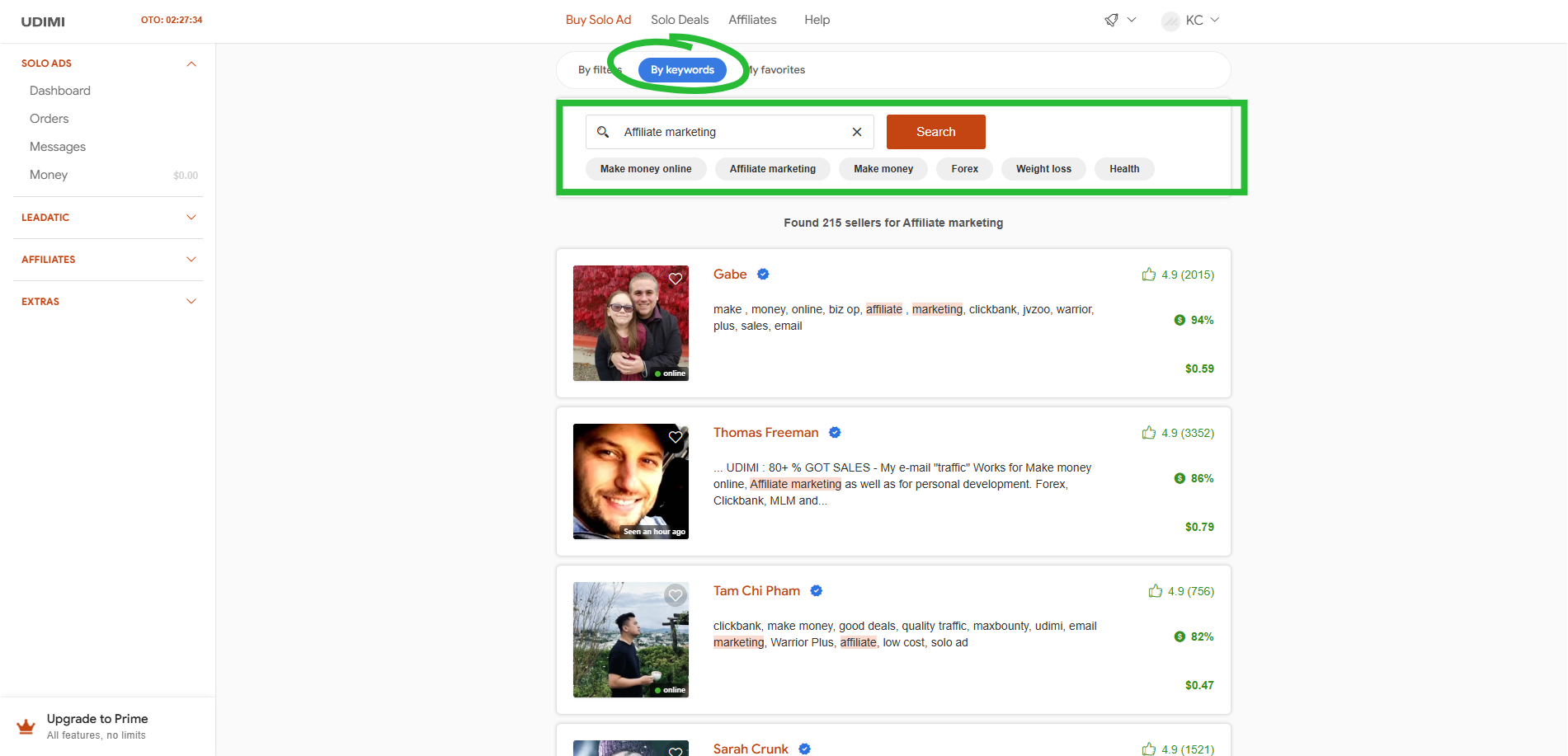
Because we’re using Kickstart Commissions for this example, look for sellers whose audience is relevant to topics such as affiliate marketing, making money online or online business.
To do this, select By Keywords and select Affiliate Marketing.
All sellers that provide solo ad traffic in the affiliate marketing niche will be displayed.
Step 3 — Review a Seller Before Ordering
Open a seller profile before placing an order.
Look at the information Udimi provides, including the seller’s ratings, price per visitor, recent traffic statistics and the niches they say their audience is interested in.
If you’re unsure whether the seller’s audience is suitable for Kickstart Commissions, you can message them before ordering.
Simple message:
Hi [Name], I’m promoting an affiliate-marketing training product called Kickstart Commissions. Is your audience a good fit for this type of offer?
Thanks!
Step 4 — Set Up Your First Solo Ad Order
When you’re happy with the seller, use the order form on their profile.
For your first test, keep the order at a level where you are comfortable with the full cost. The goal is to learn from the data — not to assume one order will produce a sale.
- Choose the number of clicks you want to order
- If you want traffic from top-tier countries only (USA, UK, Canada, Australia, New Zealand and Singapore), select Only top tier (recommended).
Add Your Kickstart Commissions HopLink
Next, add the Kickstart Commissions HopLink you created and tested in Lesson 5.
Udimi gives you two simple options for the email that will be sent:
- Only link — paste your HopLink and the Solo Ad seller will write the email for you. This is the easiest option, but you are relying on the seller to decide how the product is introduced to their subscribers.
- Ad text — provide your own email copy with your HopLink included. This gives you more control over the message being sent. You can write your own email or, if you have our Email Swipes Pack, use one of the ready-to-use Kickstart Commissions emails provided there.
Why We Recommend Writing Your Own Solo Ad Email
When you order a Solo Ad, you can let the seller write the email for you. That’s quick and easy, but I recommend writing your own email copy instead.
The biggest reason is control. You decide exactly how Kickstart Commissions is introduced, what angle is used and what the reader sees before they click your affiliate link.
It also gives you something extremely useful: your own test data.
If a different seller writes a different email every time, it becomes much harder to know what actually worked. By using your own emails, you can start testing:
- Which subject lines get attention
- Which angles generate more clicks
- Which emails produce better results
- What you should change next time
Over time, you can keep what works, improve what doesn’t and build your own collection of promotional emails based on real results.
If you’d rather not start from a blank page, our Email Swipes Pack includes ready-to-use Kickstart Commissions emails that you can use as a starting point, test and adapt as you learn what works.
You’ll have the option to claim your Email Swipes Pack at the end of this training.
The goal isn’t to write the perfect email first time — it’s to take control, test and improve.
Choose the Start Date and Place Your Order
Select the date you want the Solo Ad to start.
Udimi may also give you the option to allow the seller to begin delivery earlier than the selected date.
Review the order details and total cost carefully. When you’re happy with everything, select Continue.
After payment, the seller receives the order and can accept or reject it. Udimi will notify you when the order status changes.
Step 5 — Track What Happens
Once the order starts, Udimi records the visitors delivered and provides statistics about the traffic.
You can use this to see information such as how many visitors were delivered and where those visitors came from.
You can then return to ClickBank Reporting, which you used in Lesson 5, and check the traffic recorded through your HopLink.
If ClickBank records a qualifying sale, the related sales and commission information will appear in your ClickBank reporting as well.
Do not judge everything from one result. A Solo Ad can deliver traffic without producing a sale. Keep a record of what you ordered, which seller you used and what happened after the clicks arrived before deciding what to test next.
You Now Know the Complete Basic Process
You should now understand:
- What Solo Ads are and how they send traffic to an affiliate link
- How to use Udimi to find and review Solo Ad sellers
- How to set up a basic Solo Ad order
- How to use your Kickstart Commissions HopLink in the order
- Where to check the traffic after the order starts
You have now followed the basic process from choosing a product all the way through to sending traffic to your affiliate link.
Next up: Wrap Up — Putting It All Together
 Kickstart Commissions
Back To Hub
Kickstart Commissions
Back To Hub